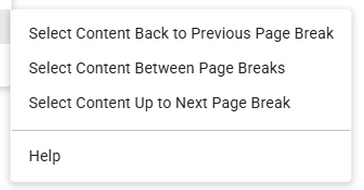
Select Content Back to Previous Page Break
Selects text from after the previous manual page break up to the cursor. The break is excluded. If there is no previous break, a message is shown.
Select a long text block without manually finding and selecting both ends. Place the cursor inside a block delimited by manually inserted page breaks, then choose one of three selection commands.
Install Page Break Tools How it works
Free of charge on Google Workspace Marketplace. No separate Page Break Tools account is required.
Selects text from after the previous manual page break up to the cursor. The break is excluded. If there is no previous break, a message is shown.
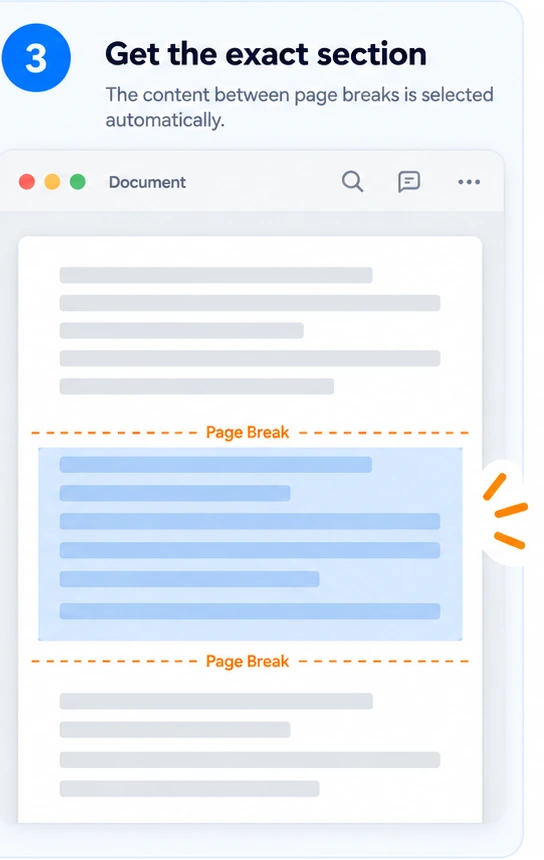
Selects the text block around the cursor, excluding its delimiting manual page breaks. If a boundary is missing, the start or end of the active document tab body is used.
Selects text from the cursor to before the next manual page break. The break is excluded. If there is no next break, a message is shown.
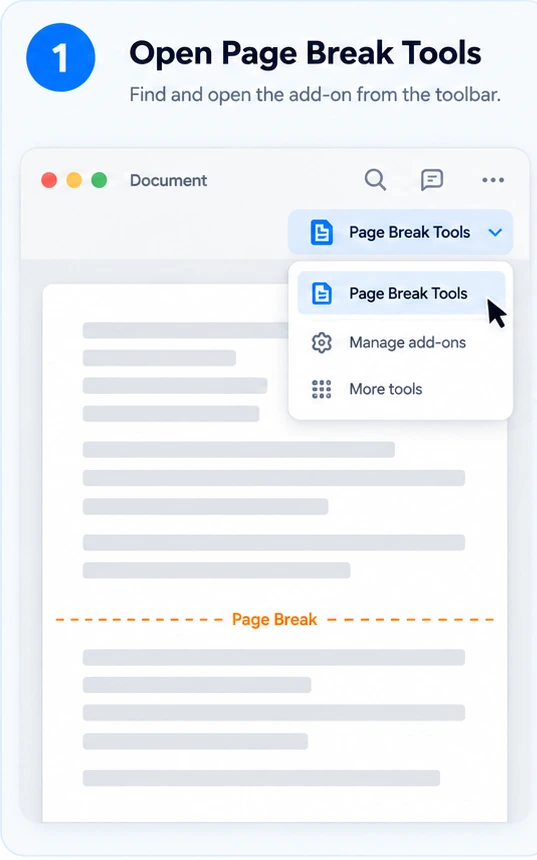
In Google Docs™, choose Extensions → Page Break Tools.
2. Choose a command
Page Break Tools uses manually inserted page breaks, not automatic page boundaries, headings or section breaks. A selected text block can span several visual pages. The commands work in the active tab body, not in headers or footers, and need selectable text. The add-on creates a selection; Google Docs handles copying and pasting.
Read the command behavior and text-selection limits.
How to select text between page breaks in Google Docs
Copy a section without dragging through pages
Page Break Tools is currently free of charge on the Google Workspace Marketplace. No separate Page Break Tools account is required.
Document access is used to locate the cursor and manual page breaks and create your selection. Google also lists access to your primary Google Account email address and personal profile information.
The add-on does not sell user data or use document content for advertising. See the Privacy Policy for document-content handling, website analytics and voluntary support email.